Tools
Live tweaks
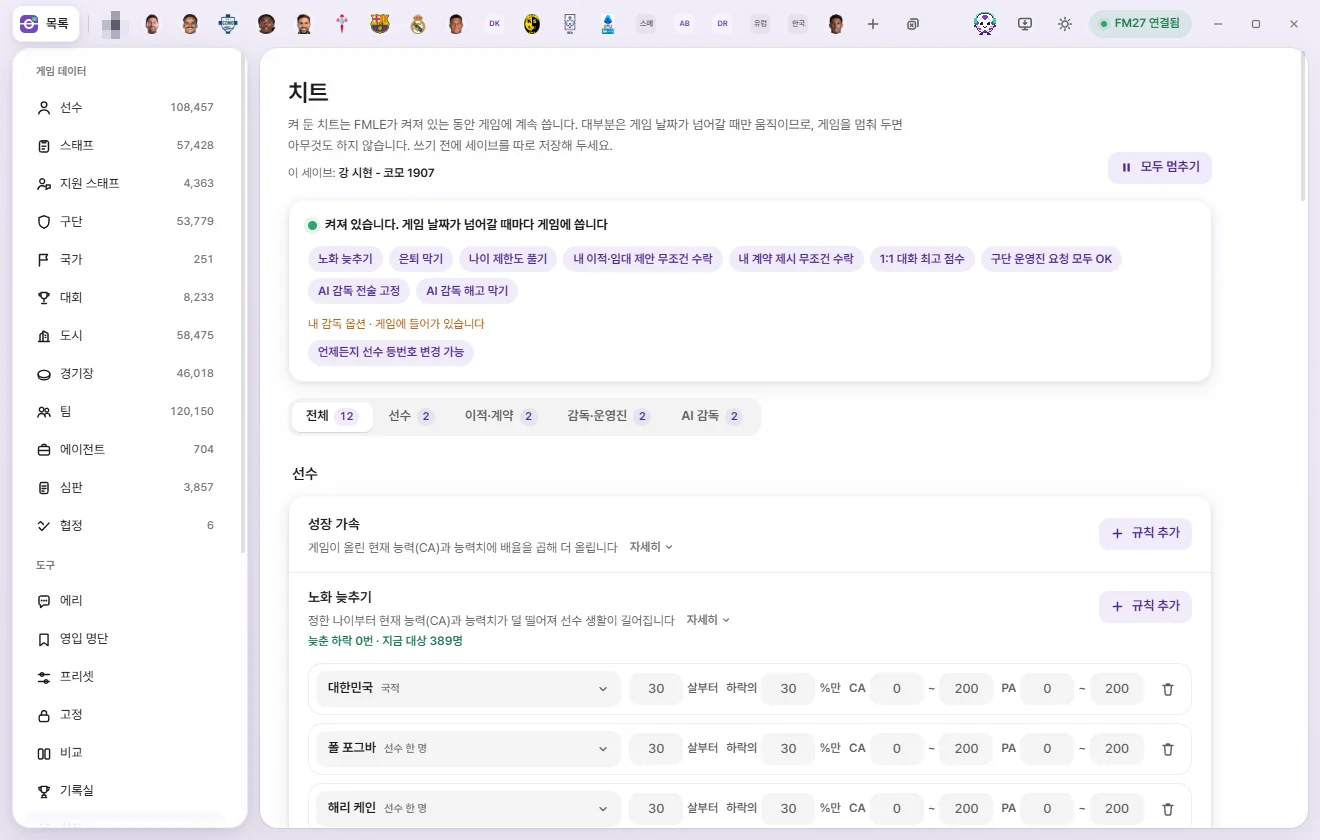
Live tweaks are rules that stay active in the game for as long as FMAX is open. They include Faster growth, Slower aging, Prevent retirement, auto-accepting offers, Prevent AI manager sackings, and Lock AI manager tactics—all remembered separately for each save.
What live tweaks are
Live tweaks aren't one-off edits—they are ongoing rules you leave on.
- They keep writing to the game while FMAX is open, and stop as soon as you close FMAX.
- Most of them act only when the game date advances. While the game is paused on the same day, they do nothing.
- You don't need to click 'Save'. Turning a tweak on puts it straight to work.
- Click Live tweaks under Tools in the left sidebar to open this screen. Whenever any tweaks are running, a count next to it shows how many are on.
Around the screen
Top bar
- Current save: Name — Shows which save the current list belongs to (Separate for each save).
- Pause all / On — Appears at the top right whenever at least one live tweak is on. 'Pause all' stops writing to the game while leaving your list and switches untouched. Click 'On' to get them running again.
Status box
The top line tells you what Live tweaks is doing right now.
| Status | Meaning |
|---|---|
| No live tweaks are on | You haven't turned any live tweaks on |
| Active. Writes to the game whenever the game date advances | Running normally |
| Paused. Nothing is written to the game | You clicked 'Pause all' |
| Starts once you load a save | The game is running, but no save is loaded yet |
| Starting | Turning on |
| Waiting for the game (…) | Not connected to the game yet, or still getting ready; the reason is in parentheses |
| Turning off… Check that the game code has been restored | You turned off a 'Game code' tweak and FMAX is still restoring the original code |
Below that, you'll see:
- Active tweak names — Click any name to jump straight to its row (switching group tabs automatically if needed).
- Your manager options · Active in game — Any My manager options you've enabled appear on their own line here.
- Warnings — Lists any tweak that ran into an issue, along with its name and why. Tweaks you turned off whose game code hasn't finished restoring yet also appear here.
Group tabs and tweak rows
Filter the list using the All · Player · Transfers & contracts · Manager & board · AI manager tabs. The number next to a tab shows how many tweaks in that group are on. FMAX remembers whichever tab you picked for next time.
Each live tweak row is laid out like this:
- Name, plus a 'Game code' badge on tweaks that patch the game's code.
- A one-line summary and 'Details' (click to expand the full explanation).
- Status line — What the tweak is currently doing (for example, 'Declines slowed: 0 · Current targets: 389'). Green means everything is working normally; orange indicates a warning.
- A switch on the right, or an 'Add rule', 'Add person', 'Add team', or 'Add manager' button.
At the very bottom, Recent activity logs up to the last 14 actions taken by your tweaks (Recent activity).
Turning tweaks on and off
- Flip a row's switch on, or add an entry with 'Add rule' (or the row's add button).
- If Live tweaks was paused, turning on a switch or adding a rule resumes it automatically.
- The first time you turn on a tweak with a 'Game code' badge, a 'Have you backed up your save?' dialog appears once. It shows how many places in the game code will be modified and notes that turning the tweak off or closing FMAX normally restores the original code. Click 'Yes, backed up' to turn it on—you won't be asked again.
- To turn a tweak off, flip its switch off or delete its rules with the trash icon. To pause everything at once, click 'Pause all'.
Separate for each save
Your tweak list and on/off states are remembered separately for each save.
- Load a different save in FM, and FMAX switches to that save's live tweaks. One save's tweaks are never written into another save.
- If you create a new save file in the game (for example with 'Save Game As'), it starts out inheriting the previous save's live tweaks and tracks them separately from then on.
- When you reopen FMAX, any tweaks that were on when you closed it turn back on automatically if 'Restore previous state on startup' is enabled in Settings (on by default). FMAX checks which save is open in the game first and turns on only that save's tweaks.
- If FMAX hasn't identified the save yet, the top of the screen shows 'Last opened save: … · Switches automatically if you load a different save in game'.
The 'Yes, backed up' confirmation is asked only once across all saves. See What FMAX remembers per save for the full picture.
What happens when you turn a tweak off?
What stays and what reverts after turning a tweak off depends on how that tweak works.
| Type | Live tweaks | When turned off |
|---|---|---|
| Patches game code ('Game code' badge) | The three auto-accept offer tweaks, Get bids when offering a player, Value my players like AI clubs, Max 1-on-1 talk score, Max tactical effectiveness, Lock AI manager tactics, Prevent AI manager sackings, Lift age limits too | Turning it off, clicking Pause all, or closing FMAX restores the original game code. Anything that already happened while it was on (completed transfers and contracts, player values recalculated and saved by the game, match records already played) remains |
| Keeps a game setting on | Approve all board requests, Max extra staff slots, Golden Generation, Show everyone in search | Turning it off or clicking Pause all reverts only what FMAX turned on (or the extra slots it raised) |
| Continuously writes values | Faster growth, Slower aging, Youth CA & PA, Prevent retirement, Keep my players happy, My club player recovery, Auto-resolve unhappiness | Stops making further changes. Values already written remain in the game |
| Holds a value and restores it | Max chairman patience | Restores each chairman's original patience while FMAX is open |
| My manager options | Become Unsackable and the other four options | Built-in game options rather than live tweaks. They write immediately when clicked, stay active even after closing FMAX, and aren't affected by 'Pause all' |
Status line after turning off a 'Game code' tweak:
- Turn off requested · Waiting to restore — The game is busy, so FMAX is waiting to put the original code back. This clears after a moment.
- Turn off requested · Restore failed: … — Couldn't restore the original code. Check the reason shown.
When you close the FMAX window, it restores all modified game code first before exiting. If it can't restore the code, FMAX stays open and displays 'Kept FMAX open because the original game rules couldn’t be restored'. What happens if FMAX terminates abnormally (such as a force-close) has not been verified yet.
Choosing targets
For Faster growth, Slower aging, and Youth CA & PA rules, use the Target button on the left of each rule row to choose who it applies to.
| Target | Meaning |
|---|---|
| All players | Every player in the game |
| Club | Players at that club. Your club appears right at the top as 'My club' |
| Single player | That individual player |
| Nation | Players at clubs in that nation (either in its league system or based in that country) |
| League | Players at clubs whose first team competes in that league this season |
| Nationality | Players holding that nationality |
Target lists become available once FMAX connects to the game and reads its data.
Player
Faster growth
Multiplies increases that the game gives to Current Ability (CA) and attributes so players develop faster. Clicking 'Add rule' creates an 'All players ×2' rule.
- Multiplier (×1 to ×10, in 0.1 steps): At ×2, players improve twice as fast.
- 'CA and all attributes' button: Pick which values get multiplied. Unchecked values still grow at the game's normal rate. Use 'All in group' next to a category heading to select a whole group at once, or click 'CA and all attributes' at the top to go back to multiplying everything. Five hidden attributes (Consistency, Dirtiness, Important Matches, Injury Proneness, and Versatility) cannot be selected.
- Prevent decline: Reverses any drops applied by the game.
CA never exceeds Potential ability (PA), and attributes never go past 20. If several rules match the same player, the highest multiplier applies. Status line: 'Boosted N times · Declines prevented: N · Targets: N'.
- CA and attributes rise together. Each month the game brings the attributes back in line with CA, and a CA raised on its own can make a few attributes jump at once. So with the multiplier on CA only, FMAX raises the attributes evenly with it, and with it on attributes only, FMAX takes CA up with them.
- Players who stop growing keep growing. A player who grew fast can sit above what the game expects for their age, and the game may stop raising their CA for a while. When the game has not raised it for over a month, FMAX adds the multiplier's share of their recent pace, a little less each time, so a player who has truly peaked slowly stops. After FMAX restarts it learns their recent pace again.
- Both follow a cause found in the game's code and have not been checked over a long run in the game.
Slower aging
Softens CA and attribute decline from a chosen age onward so players enjoy longer careers. Each rule row sets: Target · From age N (20–45) · N% of decline (0–100) · CA range · PA range. Defaults are age 30, 30%, and CA/PA 0–200.
- At 30%, a drop of 10 becomes a drop of 3. At 0% players don't decline at all; at 100% they age just as the game normally intends.
- Remainder fractions are rolled as probabilities: at 30%, a drop of 1 goes through roughly three times out of ten.
- Narrowing the CA or PA range covers only players currently inside that range. If a player's CA eventually slips below the range, they decline at the normal game rate from that point on.
- If multiple rules cover the same player, the one that slows decline the most wins. Players also covered by Faster growth's 'Prevent decline' won't drop at all.
- Retirement itself is still left to the game—pair this with 'Prevent retirement' if you want them to keep playing.
Status line: 'Declines slowed: N · Current targets: N'.
Youth CA & PA
Brings newly generated youth players' CA and PA into the ranges you set (1–200). Clicking 'Add rule' adds a rule targeting My club (or All players if your club isn't known yet) with CA 60–100 and PA 150–190.
- Applies to new youth intake players generated while FMAX is open.
- If the value rolled by the game falls outside your range, FMAX picks a new value evenly across your range. Values already inside the range are left alone.
- Attributes are scaled up or down to genuinely match the new CA (RCA, Recommended Current Ability).
- Turn on Wonderkid to push CA straight to the top of your range (never exceeding PA).
- A 'Single player' rule applies immediately to that player as a one-off.
- If multiple rules match the same youth player, the narrowest target wins (Single player → Club → League → Nation / Nationality → All players).
Status line: 'Youth adjusted: N'.
Prevent retirement
Clears retirement plans made by selected players and staff right away, wiping both the 'Set to retire' indicator and the game's scheduled retirement record.
It does not clear 'Retire after spell at current club' (the one-club-man choice). Only the 'Set to retire' indicator and the game's scheduled retirement record go; the wish to retire after playing for the current club stays. To remove that too, turn it off yourself on the player's 'Info' tab.
- Click 'Add person'.
- Everyone currently scheduled to retire in the game appears first under 'Set to retire: N' (reloaded each time you open the picker). Type a name at the top to search for any other player or staff member.
- Click a person to add them to the list. People already on the list are greyed out.
Each row shows their name, club, and 'Was set to retire on [date]', along with Open (opens their tab) and a trash button. Anyone not found in the current save is marked 'Not found in game'. You can also add multiple people at once with the 'Add to prevent-retirement list' action in Presets.
Status line: 'Retirements prevented: N'.
Lift age limits too ('Game code', on by default): Lets AI clubs make transfer and loan offers for listed players and consider listed staff for jobs even at advanced ages.
- Normally, AI clubs stop showing interest or bidding for players from age 41, and stop making loan offers from age 37. Staff are similarly ruled out or marked down for long careers, time unemployed, or age cutoffs like 76+ (click 'Details' for every exact age). With this switch on, people on your list bypass those age cutoffs.
- People at your own club are included too—if bids come in for them, simply reject them as usual.
- Competition age rules such as Under 21 and Under 23 leagues still apply as normal.
- Up to 128 players and 128 staff members.
- Once live tweaks are active and there is someone on the list, a backup check pops up once for the first time. Click 'Keep age limits' to turn off just this switch while keeping Prevent retirement on.
Status line: 'On · Players: N · Staff: N · Age-limit checks bypassed: N (N people)', or 'Turns on once you confirm save backup' before confirmation.
Keep my players happy
Keeps morale, happiness, and fondness toward you at maximum for every player at your club. By keeping their liking for you as high as possible and any dislike at minimum, chats and unhappiness issues are much more likely to resolve smoothly. Conversation scoring itself is handled by 'Max 1-on-1 talk score'. Status line: 'Managing N players'.
My club player recovery
Clears injuries and keeps Condition and Match sharpness at 100% with fatigue at minimum. Covers players across every team at your club, not only the first team. Status line: 'Managing N players · Injuries cleared: N'.
Under 'Recover', the Injury, Condition, Match sharpness and Fatigue switches turn each part on or off separately. A part you turn off is not recovered and is left to the game. You can't turn all four off: keep at least one, and to leave them all out, turn off the main switch above. When some parts are off, the status line also lists the parts that are still on.
Auto-resolve unhappiness
Ends any unhappiness tied to a player's contract with your club on the very same day. Instead of erasing the history, it stamps an end date onto the unhappiness record. Unhappiness on contracts with other clubs (such as while out on loan elsewhere) is left untouched. Status line: 'Unhappiness resolved: N'.
Keep men’s team eligibility
Allows players whose gender was changed to female to carry on playing for men's clubs and men's national teams. Changing a player's gender to female on the Info tab of their player screen adds them here automatically. See Changing gender for details.
Transfers & contracts
All five are 'Game code' tweaks. The three auto-accept tweaks and Get bids when offering a player ask for confirmation once together the first time you turn any of them on (transfers and contracts already completed stay in place even after you turn them off).
Always accept my transfer & loan offers
Other clubs accept every transfer and loan offer you submit. Applies whether you're bringing players in or sending them out, and covers offering players out as well as counter-offers.
If the status line says 'Missed the source of N offer(s). Resubmit those offers to apply', submit those offers again.
Get bids when offering a player (guaranteed interest)
When you put one of your players up with TransferRoom's 'Offer player' (right-click the player, then Transfer, then the TransferRoom offer) without picking any clubs, FMAX picks 8 clubs that suit the player's reputation and offers the player to them as if you had picked them yourself. Normally the game only offers the player to clubs that are interested, so a player nobody wants gets no bids.
- It takes at most three clubs from one nation and leaves out clubs under a transfer embargo.
- The game processes the offer the next day, and a few days later those clubs bid. They bid even for a player nobody wanted.
- The fee is the asking price you set. If you set none, each club bids its own amount, which the game works out from the player's value.
- You decide whether to accept a bid. Personal terms and the actual move day then follow the game's rules; outside a transfer window the player moves when the next window opens.
- A club that cannot sign the player under the registration, eligibility or competition rules drops out. Cases where the game blocks the offer itself, such as a long-term injury, stay blocked.
- With 'Always accept my transfer & loan offers' on as well, clubs you pick yourself for an offered player bid too.
- Transfers between AI clubs stay as normal.
- If you reload the save after making the offer and before the clubs answer, each club decides on that offer as normal.
- Bids already received and completed transfers stay after you turn it off.
Status line: 'On · M clubs added to N offers · K bids'.
Always accept my contract offers
Players accept every contract your manager puts on the table—including renewals, free signings, and personal terms after an accepted transfer bid. Contract start dates remain unchanged.
Block player rejection on accepted transfers
Once you accept another club's transfer offer, your player won't turn down the move (covering both the transfer itself and personal terms). The actual transfer date stays unchanged.
- Include loan offers: When the tweak above is on, applies it to outgoing loan offers you've accepted as well.
Value my players like AI clubs
Values your club's players using the exact same formula the game uses for AI clubs' players. Normally, when a club's manager is human, the game strips out the premiums AI clubs get (key player status, no need to sell, registration rules, reluctance to sell mid-season), reads squad status from contract promises instead, and skips the club's financial adjustment. Turning this on gives your players the same valuation an AI club would get.
- Because of that, player values can go down as well as up.
- Both the transfer value shown on screen and the bids AI clubs make use this calculation.
- Cached values already stored by the game update the next time the game recalculates them.
- If you've set an asking price on a player, AI bids use that asking price first.
- Prices when you buy players from other clubs are unchanged.
Status line: 'On · Valued like AI clubs: N times'. If another mod doing the same job is already installed, FMAX shows 'Already enabled by another installed mod (FM27 AI Value) · FMAX left it untouched'—that mod stays in charge and FMAX doesn't touch the game code.
Manager & board
Max 1-on-1 talk score
'Game code'. Sets the internal score the game uses to decide a player's reaction in 1-on-1 chats with your manager to the maximum (10000). Team talks, press conferences, group conversations, and AI managers' talks are unchanged. Individual topics and dialogue choices still carry extra modifiers of their own, so not every single option is guaranteed to go well.
Max tactical effectiveness
'Game code'. Keeps tactical effectiveness (tactical familiarity, player support, and player ability) at 100% both on screen and in matches for the teams your manager runs (your club's first team, plus your national team if you manage one).
- The tactics screen, player profiles, team selection, and the match engine all use this maxed value—even if you switch tactics mid-match.
- Players' underlying attributes, familiarity, and relationships aren't modified, so turning it off brings back the original values on the next calculation.
- Matches already played and saved match records keep the values from when they were played.
- Transfer targets evaluated against your team (once scouted thoroughly enough) also show 100%. Other teams and AI managers are unaffected.
- Game screens that are already open may need to be reopened before the updated numbers show up.
Status line: 'On · My teams: N · Player checks: N · Maxed in match: N times'.
Approve all board requests
The board says yes to every request you make. This keeps the game's built-in 'Override Board' setting (a Console edition store item) turned on. Normally the game switches that flag off each time a request is processed, and FMAX immediately switches it back on—checking continuously even without the game date advancing. Status line: 'On · Re-enabled N times'.
Max extra staff slots
Fills the extra staff slots permitted by your board to their maximums: 10 Coaches and Physios, and 5 Sports Scientists and Performance Analysts (each for the First Team, U23s, and U19s), plus 15 Scouts and 5 Recruitment Analysts. Any slot already at that level is left alone. Status line: 'Set to max'.
Golden Generation
Keeps the Console edition store item 'Golden Generation' switched on for your club. The game reads and clears this setting when generating a youth intake, and FMAX switches it back on every day.
Show everyone in search
Reveals every player and staff member in searches (a Console edition store item). Because the game writes this setting to your save file and reads it on load, you need to save and reload your game after turning it on for it to appear. Status line: 'On · Visible after saving and reloading'.
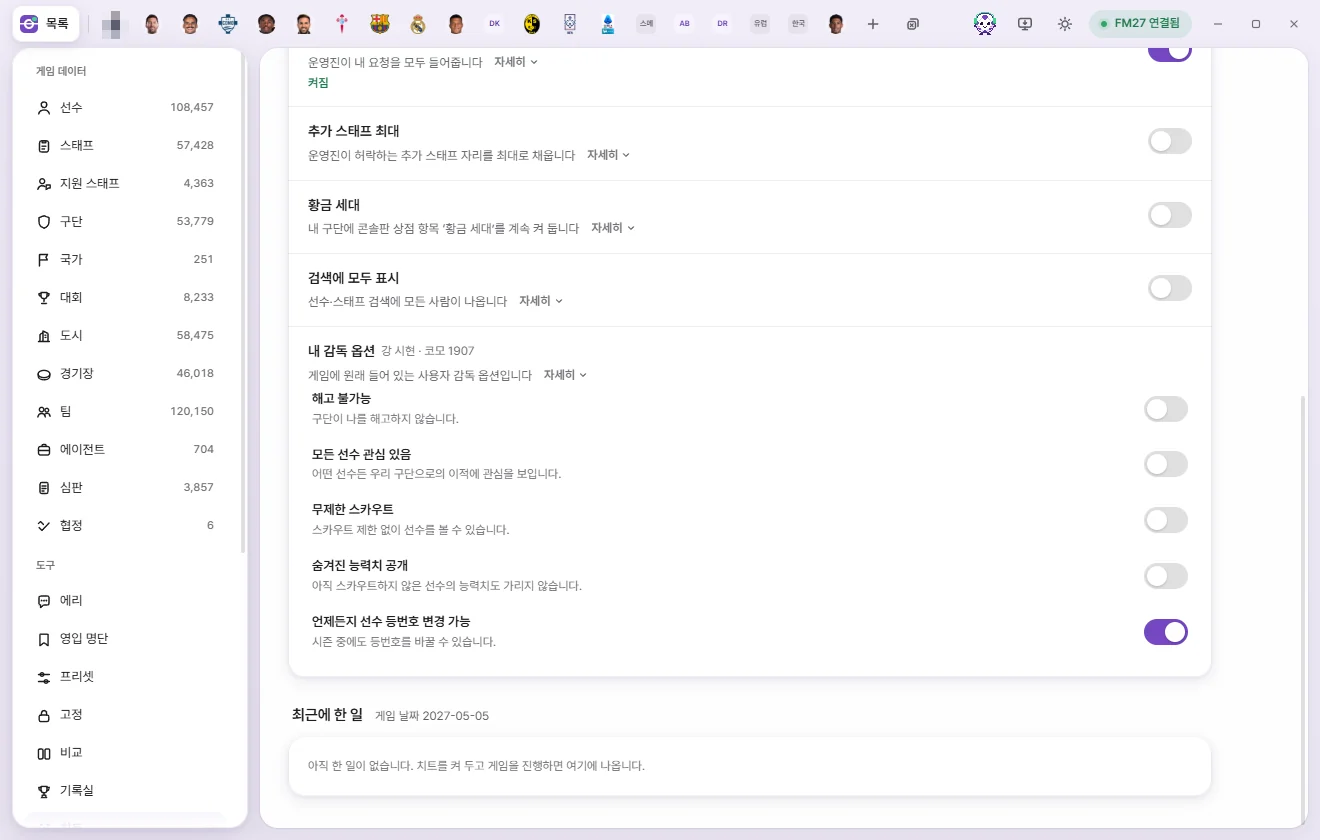
My manager options
Built-in human manager options native to the game itself. Next to the title, FMAX shows your manager's name and club (or Unemployed).
| Option | What it does |
|---|---|
| Become Unsackable | Your club will never sack you |
| All Players Interested | Every player shows interest in joining your club |
| Unlimited Scouting | View and scout players without scouting restrictions |
| Show Masked Attributes | Reveals all attributes even for players you haven't scouted yet |
| Change Squad Numbers Anytime | Lets you change squad numbers even mid-season |
- If your save has more than one human manager, pick yours first with 'Choose my manager'. You can switch later using 'Switch manager'.
- If you see 'Couldn’t find your manager in game', click 'Reload'.
- 'Become Unsackable' controls the exact same setting as 'Toggle Become Unsackable' in the My manager tab's ⚡ menu.
AI manager
Lock AI manager tactics
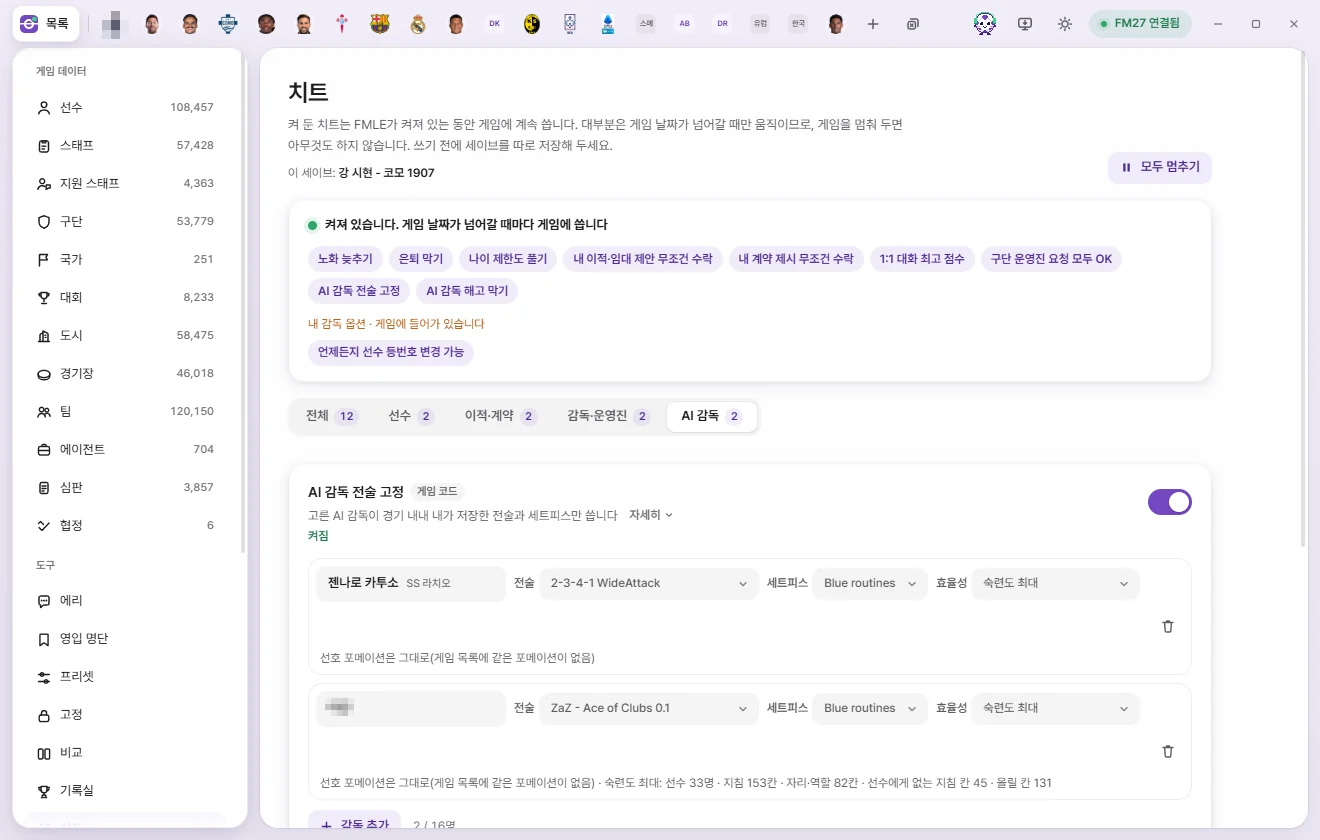
'Game code' (16 locations). Forces selected AI managers to use only your saved tactic and set piece files throughout every match.
- Flip the switch on.
- Click 'Add manager' and search for staff by name, club name, or Unique ID. First-team managers appear first, followed by other team managers and then other staff. Your own manager and your club's staff are excluded. Up to 16 managers.
- On each row, pick Tactics and Set pieces files. Saved files from your game (
Sports Interactive\Football Manager 27\tacticsandset piecesinside your Documents folder) are listed here. A newly added manager starts with the same files as the manager right above them (or the first readable file if there isn't one). - Choose Effectiveness:
- Max familiarity (default): Maxes out whichever familiarity slots players on that manager's squad already have that match the chosen tactic (the 6 team instructions, plus Position and role slots). It doesn't create new slots a player doesn't have yet.
- Leave as is: Leaves tactical familiarity to the game.
- Set as trained tactic (coming soon): Not selectable yet.
What it does:
- Formations and roles in both phases of play, every player instruction (including opposition instructions), and all team instructions follow the chosen tactic file to the letter. Set pieces use the chosen set piece file.
- The AI cannot change tactics mid-match either. Substitutions are still handled by the AI as normal.
- Because the lock is tied to the person, it follows them if they move to another club. You can also pick a coach or other staff member, and it takes effect once they take charge of a team.
- Updates both Preferred formations on the manager's profile (In Possession and Out of Possession) to match the chosen tactic, leaving either phase as is if the game has no matching preset formation. Turning the tweak off restores the originals.
- Applied when match preparation starts, so turning this on mid-match takes effect from their next match.
- Human managers, opposing teams, and other matches are unaffected.
Status line: 'Choose a manager to start', 'Choose tactic and set piece files to start', 'Applying to game', or 'On · Managers: N · AI tactic changes blocked: N'.
Status on each manager row:
| Status | Meaning |
|---|---|
| Choose files | Either the tactic file or set piece file hasn't been picked |
| Selected file isn’t in the folder. Choose another file | The file was deleted or moved; '(file missing)' appears on the picker |
| Couldn’t read this file | The file is corrupted or uses an unfamiliar format |
| Applies once they manage a team | They aren't currently managing a team |
| Loads at next match preparation | Waiting for their next match |
| Loaded into N match engine(s) | Applied and active |
| The game couldn’t read this file | The game rejected the file |
Underneath, you'll see the preferred formations ('Preferred formations … / Out of Possession …') and familiarity result ('Max familiarity: N players · N instruction slots · N position/role slots', plus how many slots players were missing, if any). If it says 'This tactic file format isn’t supported yet', only preferred formations and familiarity couldn't be matched—the tactic lock itself still works.
Prevent AI manager sackings
'Game code'. Selected clubs and national teams will never dismiss their manager for any reason.
- Flip the switch on.
- Click 'Add team', then find and click teams under the Men’s clubs · Women’s clubs · Men’s national teams · Women’s national teams tabs. Teams are ordered by highest reputation first, and you can pick several in a row. Your own club isn't listed. Up to 32 teams.
- Selected teams appear as chips. Click a chip's name to open that club's tab (or nation's tab for a national team), or click × to remove it. Women's clubs are tagged 'Women’s', and teams where dismissals have been stopped show 'Blocked N'.
- Blocks: sackings, club-driven mutual terminations, and replacements by new owners after a takeover.
- Protects the first-team manager at clubs and the senior manager at national teams—including any new manager appointed later.
- Resignations, moves to other clubs, and whether an expiring contract is renewed are still left to the game.
- We've verified that national team departures pass through the same game code, though we haven't yet logged an actual FA sacking being blocked in live play.
Status line: 'Choose a club or national team to start', or 'On · Protecting N clubs, N national teams · Attempts blocked: N'.
Max chairman patience
Keeps other club chairmen's patience at maximum so AI managers are sacked less often. This doesn't block sackings outright—use 'Prevent AI manager sackings' if you want to make sure a chosen club's manager can never be dismissed. Turning it off while FMAX is open restores each chairman's original patience. Status line: 'Managing N chairmen'.
Status line warnings
| Warning | Meaning |
|---|---|
| Couldn’t turn on: … | Failed to turn on; the reason follows |
| Game code differs from expected, so it wasn’t changed | This game version's code differs from what FMAX expects, so FMAX left it untouched |
| Multiple human managers — couldn’t pick one | Pick your manager under 'My manager options' or 'My manager & club' on the left |
| Finding your manager / Finding your manager and club | Looking up your human manager in the game |
| Applying to game | Turning the tweak on |
| Turn off requested · Waiting to restore / Restore failed | See What happens when you turn a tweak off? |
Recent activity
Logs up to the 14 most recent actions performed by your live tweaks, with 'Game date …' shown at the top right. Click any row to open that person's or club's tab.
| Tag | Details |
|---|---|
| Prevent retirement | Cleared a retirement plan (with the date they had planned to retire) |
| No sacking | Blocked an attempt to sack the manager |
| Age limit | An AI club assessed a player without age limits (with age and whether it was a loan), or for staff, 'Considered as a job candidate regardless of age' |
| Youth | How a new youth player's CA and PA (and RCA) were adjusted |
Before anything has happened, this section shows 'Leave live tweaks on and advance the game to see activity here'.