Tools
Korean names
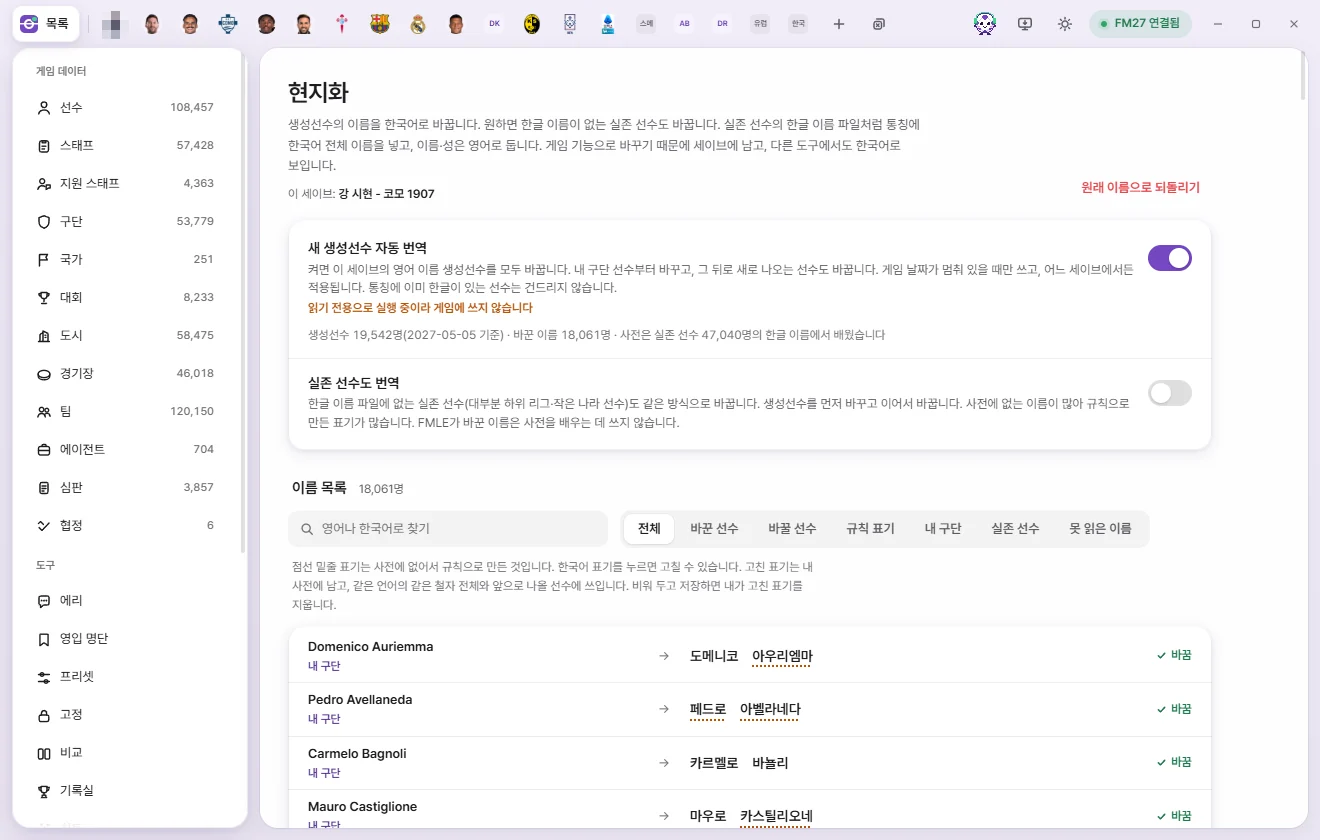
Translates English regen names into Korean, along with real players and staff who lack Korean names if you choose. Changes use the game's own naming feature, so they stay in your save.
This feature only appears when FMAX is set to Korean.
What it changes
Regens (newgens) in FM27 are generated with English (Latin-script) names. Korean names puts a full Korean name into the player's Common name field (for example, Giacomo Nocera → 자코모 노체라), while leaving their first name and surname in English. Because this is the exact same method Korean name files use for real players, regens look just like real players in-game.
- Because names are changed through the game's own feature, they stay in your save. They remain in Korean even if you close FMAX, and show up in Korean in other tools as well.
- Anyone whose Common name already contains Korean characters is left untouched.
- If a regen originally had a Common name (such as a nickname), FMAX translates that Common name instead.
- The 'Current save:' line at the top shows which save FMAX is writing to.
How Korean spellings are chosen
For each word in a name, FMAX picks a spelling in this order:
- Your custom spelling (your personal dictionary)
- A spelling learned from real players’ Korean names from the same country and language
- Phonetic transcription rules for that language
- A spelling learned from other countries
- General rules
Every time you open a save, FMAX learns word-by-word spellings from the Korean names that real players have in that game. If your game uses a Korean name file for real players, regens inherit those same spellings. Without such a file, there is nothing to learn from, so only Rule-based spellings are produced. Names changed by FMAX itself are never used for learning.
Which language rules to apply is decided from the person's nationality and the letters in their name. Korean names are written surname-first without spaces (김민준), while Japanese and Chinese names follow standard Korean media conventions.
Korean names are read the way passports and clubs usually romanize them. Each part between hyphens is read as one syllable (Keon-Woo → 건우, Sung-Yeul → 성열); only a name written as one word is split into syllables (Minjae → 민재). When a spelling can be read two ways (Jun → 준 or 전), FMAX picks the syllable more common in names. Some people can still come out wrong; fix such a name under 'Editing a spelling' below and the fix applies to every name with that spelling.
When the spelling rules change
When a new version of FMAX improves the spelling rules, names it changed before are written again automatically at the next localization.
- Only names whose Korean changes because of the changed rules are written again. A spelling learned from real players that has changed since is not, on its own, a reason to write a name again.
- Only names still exactly as FMAX wrote them are written again. Names you changed yourself, in the game or in FMAX, are left alone.
- When there are names to write again, 'n names to rewrite with the new spelling rules' appears below the status line, and the To rewrite filter of the name list shows 'current name → new name'.
- Writing happens while the auto-translate switch is on and the game date stands still. Once a save has been compared in full, it is not done again.
- 'Restore original names' still takes names back to the very first ones.
Turning it on
Auto-translate new regens
- Turn on the switch.
- When turning it on for the first time, FMAX asks 'Have you backed up your save?'. Back up your save separately, then click Yes, backed up.
- FMAX translates English-named regens in the current save in order—starting with My club's players—and continues translating new regens that appear later.
- Writes names only while the Game date is paused. While days are advancing, FMAX waits and resumes once the date stops.
- Scans for new regens once every 7 in-game days, and checks immediately whenever you open the Korean names screen.
- The switch applies in any save. Regens generated while FMAX was closed are caught up the next time you run it.
- If you turn off Restore previous state on startup in Settings, this switch also starts turned off when you launch FMAX.
Also translate real players
Translates real players missing from Korean name files (mostly lower-league or smaller-nation players) in the same way. Starts turned off.
- Runs after all regens have been translated, and requires the auto-translate switch to be on.
- Because many of these names aren't in the dictionary, Rule-based spellings are common.
Also translate staff
Translates managers, coaches, scouts, and other staff who have no Korean characters anywhere in their name, covering both generated and real staff. Starts turned off, and runs after all players have been translated.
Turning off either switch stops further changes for that group. Names already changed remain in place and can be restored together with 'Revert to original names'.
Checking progress
The line below the switches shows the current status.
| Status message | Meaning |
|---|---|
| Off · n names changed in this save remain in place | The switch is turned off |
| Starts once you load a save | No save is open in the game |
| Looking for regens | Reading players from the game |
| Resumes when the game date stops · n remaining | The game is currently advancing the date |
| Game is busy, retrying shortly | Automatically retries after a moment |
| Translating · n remaining | Writing to the game, with progress shown on the bar |
| All done · Will continue as new regens appear | Everything is up to date |
| Running in read-only mode, so nothing is written to the game | FMAX is running in read-only mode |
| Stopped because a shared name entry was affected | Stopped to avoid changing other people's names along with it. Nothing more will be written until FMAX is restarted |
The line underneath shows the regen count (and when it was checked), the number of real players and staff without Korean names, changed names, names to rewrite with the new spelling rules, names to change, Unreadable names, and how many people the dictionary learned from.
Name list and editing spellings
The Name list shows 'Original name → Korean' one person per row, with 'Changed', 'Pending', 'To rewrite', or 'Leave as is' at the end of each row.
- Search: Search in English or Korean.
- Filter: All, Changed, To change, To rewrite (only when there are names to rewrite with the new spelling rules), Rule-based, My club, Real player, Staff, Unreadable.
- Shows 200 people at a time; click Show n more at the bottom to load more.
- Spellings with a dotted underline were built from rules because they weren't in the dictionary. Hover over a word to see its language and source (Your custom spelling / Learned from real players’ Korean names / Built from rules (not in dictionary) / Kept as is (non-Latin text)).
Editing a spelling
- Click the Korean word you want to edit.
- Type the new spelling in Korean.
- Press Enter or click Save. Press Esc to cancel.
Your edited spelling stays in your personal dictionary and is used for every matching spelling in that language as well as future players. If auto-translate is on, players already renamed with that spelling are updated in turn. Clearing the box and saving deletes your custom spelling and returns to the dictionary or rule-based spelling.
Revert to original names
Click Revert to original names in the top right and confirm to restore original names.
- Reverts only Common names changed by FMAX in this save—across regens, real players, and staff alike.
- Only reverts people whose name is still exactly what FMAX wrote. Names changed in the meantime by the game or another tool are left alone.
- Clears the Common name for anyone who originally had none.
- Also turns off auto-translate, while keeping Your custom spelling entries (your personal dictionary).
- Reverting also runs while the Game date is paused, showing 'Reverting to original names · n remaining' in the status line.